

Harnessing AI Power: Copilot for Microsoft Teams Phone System
Discover how Copilot for Microsoft Teams Phone leverages AI to enhance business calls with real-time summaries, actionable insights, and seamless integration.
 Luis FloresProduct Manager2 min read
Revolutionizing Business Communication with AI in Teams Phone
In today's rapidly evolving business communication landscape, Microsoft Teams has emerged as a game-changer, offering a robust suite of tools designed to enhance collaboration and productivity.
One of the latest and most exciting innovations in this space is Copilot for the Microsoft Teams Phone System (Teams Phone). This cutting-edge feature integrates generative AI into phone calls, making every interaction smarter, more efficient, and more productive.
In this article, we’ll explore what Copilot for Teams Phone is, its key features, and the benefits of implementing it in your organization.
What Is Copilot for the Microsoft Teams Phone System?
Copilot for Teams Phone is a groundbreaking AI-driven feature that transforms the way businesses handle phone calls.
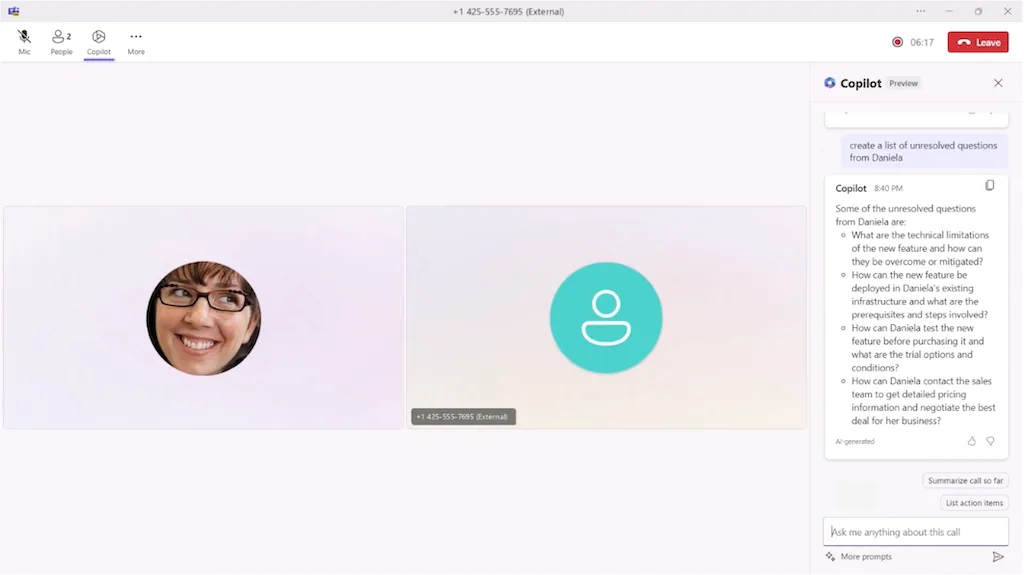
Designed to work seamlessly with VoIP and PSTN calls within the Teams environment, Copilot provides real-time summaries and actionable insights, allowing users to stay focused on the conversation rather than getting lost in note-taking.
Watch the Demo Here:
Key Features of Copilot in Teams Phone
Real-Time Summaries
Automatically generates a concise summary of key discussion points during a call.
Helps users capture the essence of the conversation without distractions.
Actionable Insights
Analyzes call content to extract important insights.
Aids in improving communication, decision-making, and follow-ups.
Seamless Integration with Microsoft Teams
Works effortlessly with other Teams features, including chat, meetings, and file sharing.
Ensures a cohesive and efficient user experience across all communication channels.
Benefits of Implementing Copilot in Your Organization
Boosted Productivity
With automated note-taking and real-time summaries, employees can stay engaged in conversations rather than manually documenting key points.
Enhanced Communication
By providing clear and structured summaries and insights, teams can improve collaboration, reduce misunderstandings, and streamline workflows.
Increased Efficiency
Copilot automates call management, reducing administrative tasks and ensuring that information is well-organized and easily accessible.
Conclusion
Copilot for the Microsoft Teams Phone System is more than just a communication tool—it’s an AI-powered assistant that elevates business interactions and takes collaboration to the next level.
By integrating AI into phone calls, businesses can stay ahead of industry trends while enhancing communication efficiency and decision-making.
💡 Is Your Business Ready for AI-Powered Communication? Start leveraging the power of Copilot for Teams Phone today and transform the way your team connects, collaborates, and communicates.
📌 Want to learn more? Contact us now for details!

Keep reading
See all articles
Teams Phone Extensibility for Dynamics 365 Contact Center: Integration and Benefits
Learn how integrating Teams Phone with Dynamics 365 Contact Center enables businesses to consolidate their telephony infrastructure, enhance operational efficiency, and reduce costs, delivering more personalized and efficient customer experiences.

Why Migrate Your VoIP Telephony to Microsoft?
Discover why migrating your VoIP telephony to Microsoft is a strategic move. Explore solutions like Teams Phone, Teams eSIM, and powerful integrations with Dynamics 365 for sales and customer service.
What is Microsoft Teams Phone (Softphone) and How to Use It
Learn what Microsoft Teams Phone (softphone) is, its key benefits, and how to configure and use it to make and receive calls from any device with internet access.
Newsletter
New articles, in your inbox.
Dialing, voice and AI, without the noise. Unsubscribe anytime.
By submitting, you agree to receive emails from Astroline. See how we handle your data in our privacy policy.